Machine technical documentation Operational document
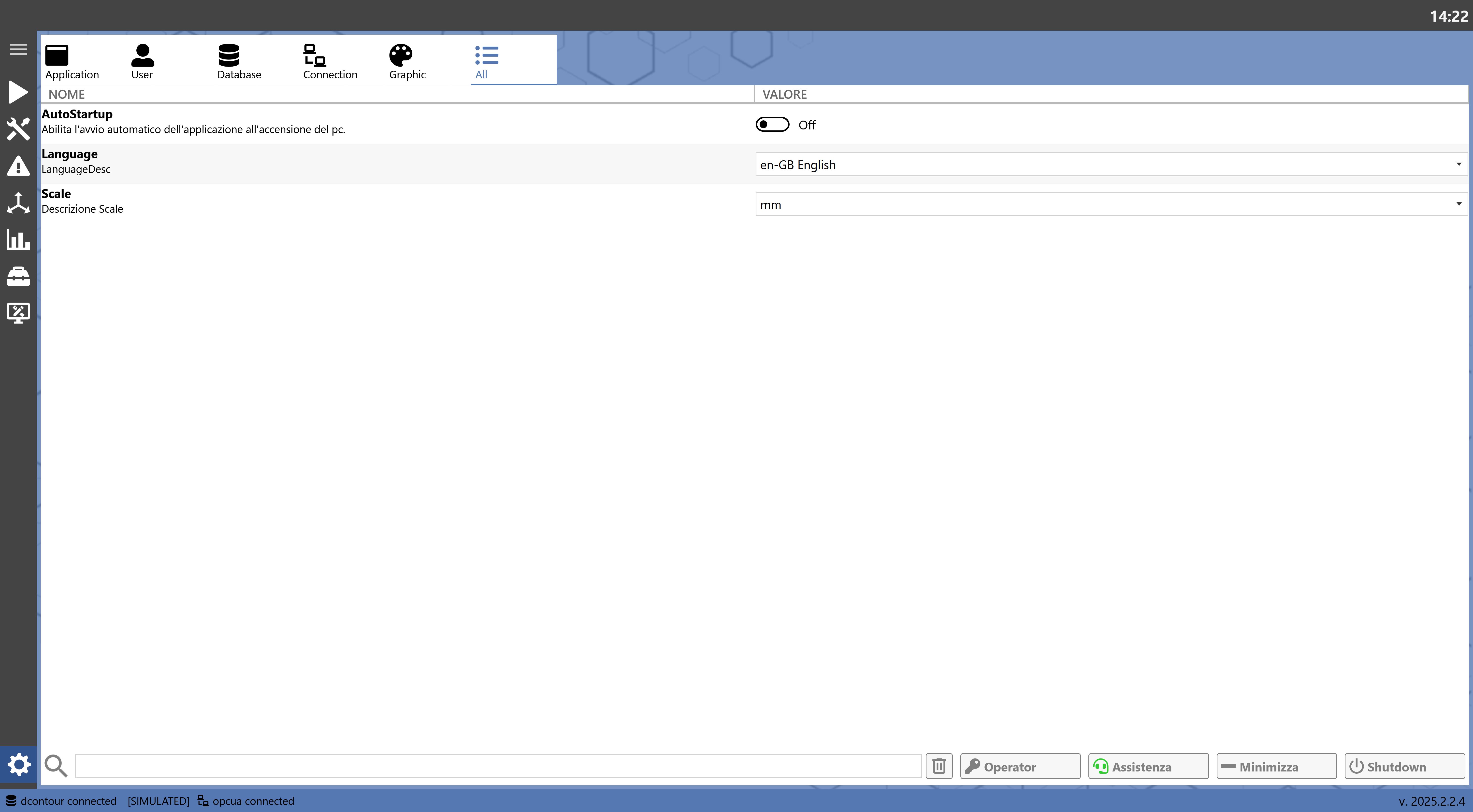
The following screen shows the Machine Settings page, which allows the user to configure various system parameters.
Sections
To facilitate navigation, the settings are divided into sections that can be displayed by clicking the icons at the top of the page.
| Application
Displays the system operating settings. |
| User
Displays the settings for user preferences when using the system. |
| Database
Displays the database connection settings. |
| Connection
Displays the connection settings between the application and the machine. |
| Graphics
Displays the settings for changing the application graphics. |
| All
Displays the settings for all sections in a single list. |
Search Bar
Below the parameter list is a search bar for filtering the desired entries.
| Clear Filter
Clears the text entered in the search bar. |
Other Buttons
At the bottom right are buttons for requesting remote assistance or shutting down the machine.
| Admin Login
Allows Donatoni operators to log in to the system with administrator rights.
Depending on the user's authorization level, additional parameters may be displayed.
|
| Remote Assistance
Opens a panel for requesting remote assistance from a Donatoni Technician. |
| Minimize
Minimizes the program window. |
| Shutdown
Allows the application to be closed or restarted. Allows the computer to be shut down or restarted. |