

When the line is selected, the properties of the selected entity are displayed on the right and can be modified.
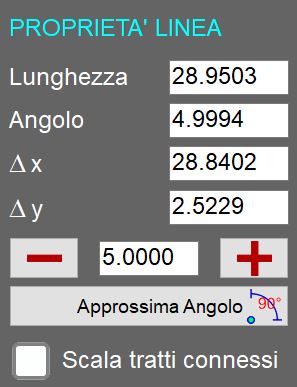
Parameters
Length | Indicates the linear distance between the two ends of the selected line, calculated from their coordinates in the work area. |
Angle | Indicates the orientation of the line relative to the horizontal axis of the reference system. |
Δx | Indicates the change in the X coordinate between the start and end points of a line or entity, i.e. the horizontal distance travelled relative to the X axis of the reference system. |
Δy | Indicates the change in the Y coordinate between the start and end points of a line or entity, i.e. the vertical distance travelled relative to the Y axis of the reference system. |
 | Extend/shorten selected line |
 | Round Angle |
Scale connected segments | Applies proportional scaling to all entities directly or indirectly connected to the selected line. |
