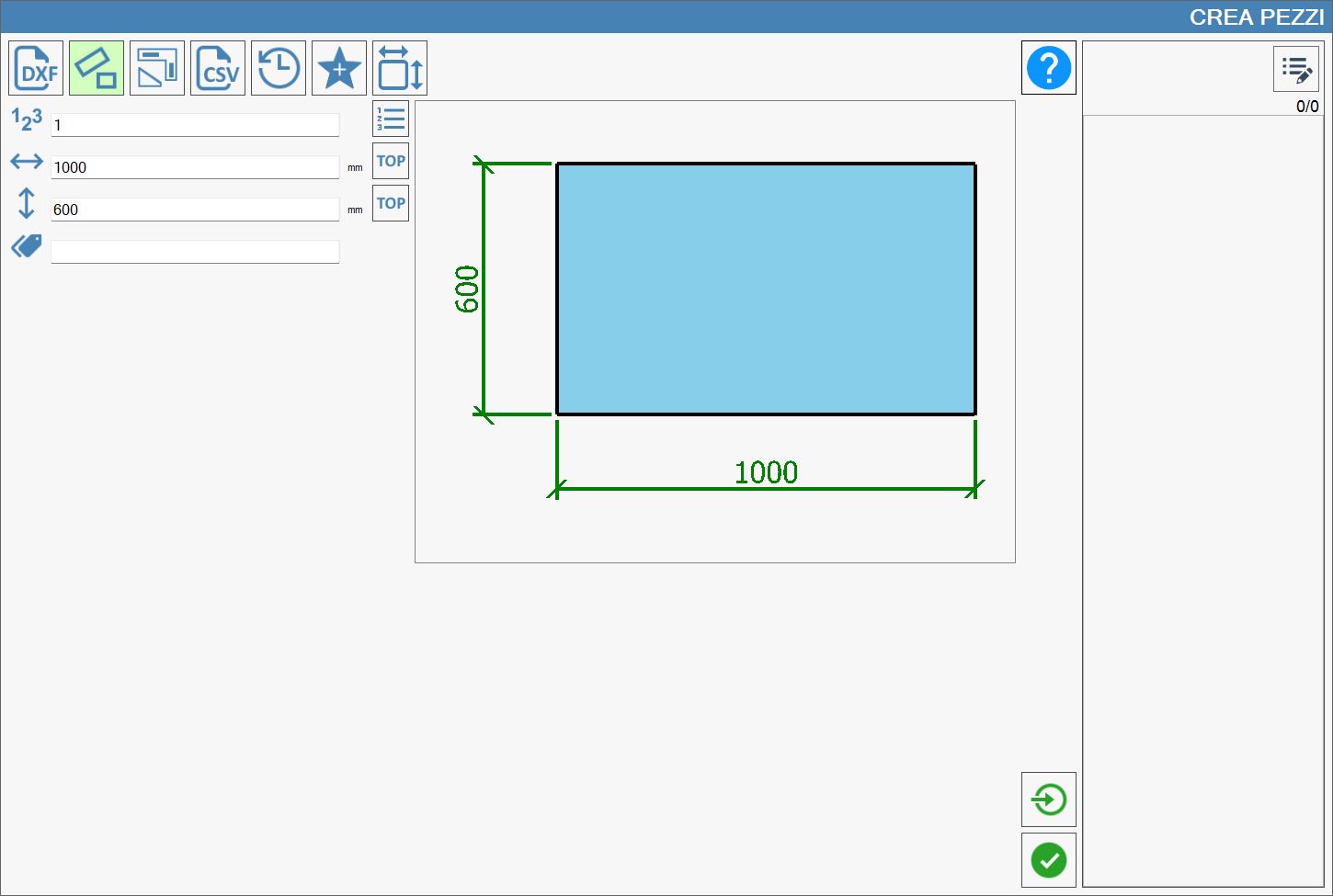
Rectangular pieces can be created by entering the width and height dimensions and adding them to the list of pieces to be machined.
The program also allows an identifying mark (or label) to be associated with each piece and the number of repetitions of rectangles with identical dimensions to be set.
Parameter description
The following data is required to create rectangular pieces:
Number of pieces Number of copies of the piece with the same dimensions.
Width Rectangle width. It is measured in the unit shown to its right.
height Rectangle height. It is measured in the unit shown to its right.
Mark Label added to the piece for identification. This parameter is optional because it is not essential for creating the piece.
Additional buttons
The following side buttons also allow additional actions to be performed.
Single import When this button is enabled, multiple separate pieces can be created in a quantity of one each instead of a single piece with multiple copies.
Dynamic Tag Top Assigns the Dynamic Tag Top to one side of the rectangle.
To enable the function associated with each button, press it. When enabled, it is highlighted in light green.
NOTE
The “Dynamic Tag Top” buttons next to the width and height boxes are mutually exclusive. The Dynamic Tag Top can therefore be assigned to only one side of the rectangle.