Donatoni Macchine
Machine technical documentation Operational document

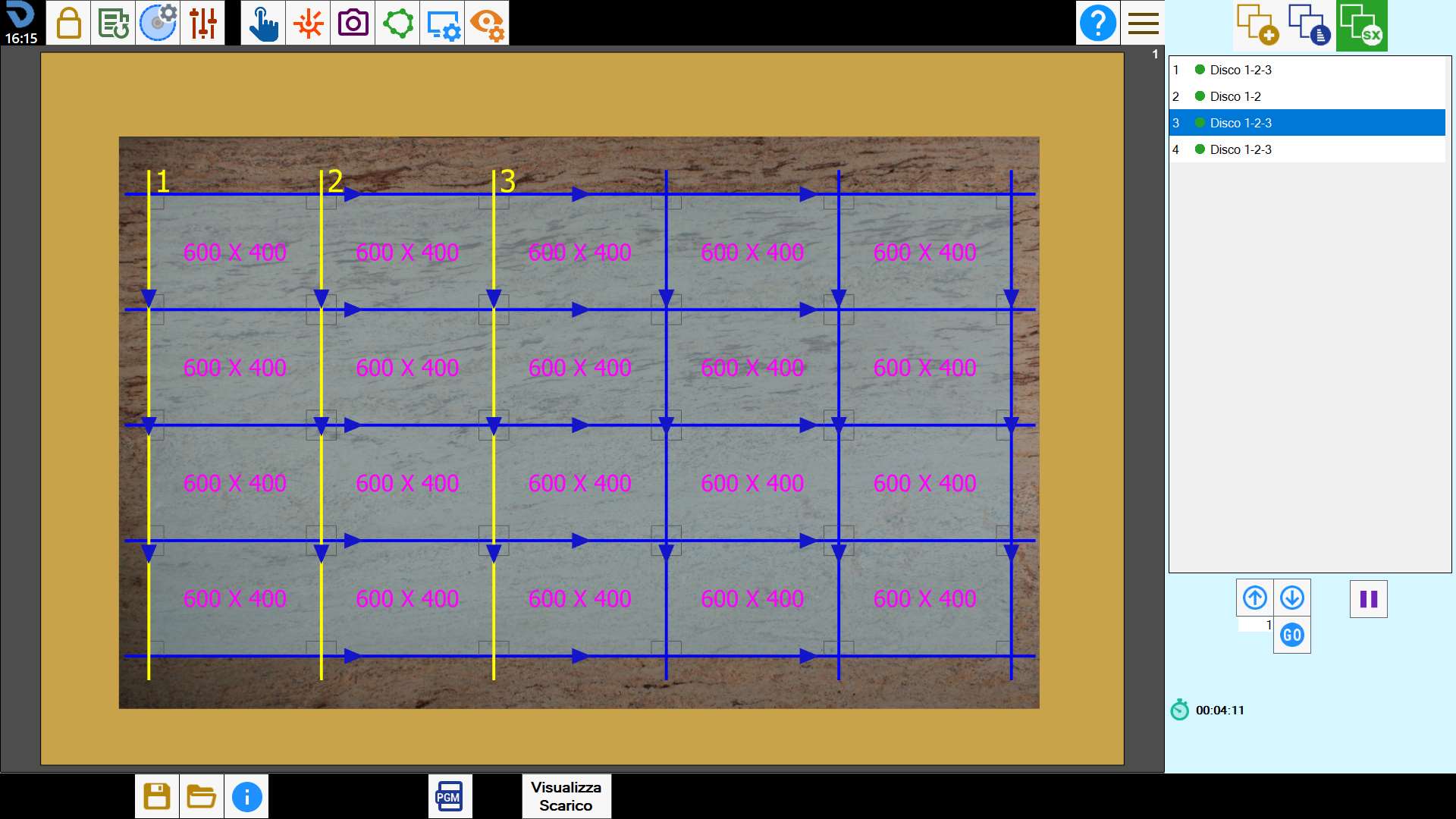
This screen shows the spindle combinations used by the machine to perform the cuts.

0.png

Combined cut list

Each item in the list on the right shows the combination of spindles used to perform a set of cuts simultaneously.

1.png

NOTE

If a spindle is manually disabled using the dedicated command in the tool panel, it is not considered in cut combinations.

As with standard cuts, their order in the list can be changed or they can be disabled.

2.3-20250613-084005.png

Enable/Disable cut
Indicates whether the cut must be enabled or disabled for the working.
Pressing the button changes its status.

0.3-20250711-120847.png

Move using arrows
Allows the selected cut to be moved to the position above or below.

0.8-20250704-141714.png

Move to desired position
Allows the currently selected cut to be moved to the position indicated in the adjacent text box.

0.7-20250704-141511.png

Pause
Allows a pause to be inserted in the position immediately after the selected cut.

NOTE

Any operation performed on an item in the list affects all the cuts it contains.

Buttons

The following button is located in the bottom bar:

3.png

Display Unloading
Provides access to a screen through which the operator can create an unloading program to position rows of pieces on the dedicated belts.

;